> ## Documentation Index
> Fetch the complete documentation index at: https://sequence-0fb8d9e6-api_docs.mintlify.site/llms.txt
> Use this file to discover all available pages before exploring further.
# Smart Swaps
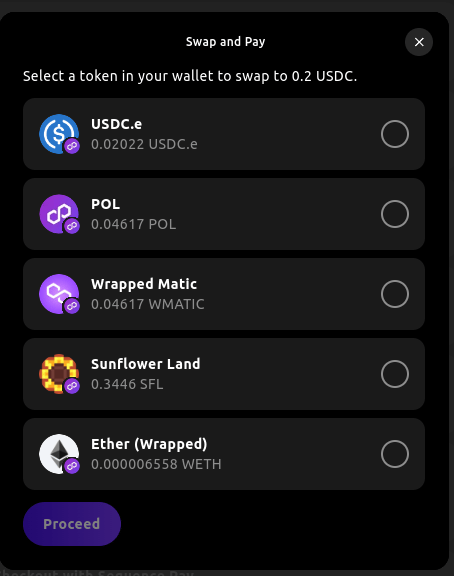
> Sequence Smart Swaps auto detects eligible currencies in the user's wallet and swaps them to the target currency. Developers can define the target currency and Sequence will handle everything, including the UI and flow through Web SDK.
The power of smart swaps is intelligently detecting the currencies available to the user as well as batching multiple transactions together to if the user is utilizing a Sequence wallet to simplify the UX. You can say goodbye to separate `approve` and `transfer` transactions!
If you intend to use smart swaps with your custom token, please ensure you provide sufficient liquidity for your token (preferably USDC, USDT, or ETH) on a supported DEX such as Uniswap.
Smart Swaps are only supported on mainnets, such as:
* Ethereum
* Arbitrum
* Avalanche
* Base
* Blast
* BSC
* Optimism
* Polygon
* ...
Here are some of our supported liquidity pool providers:
`UniSwap` `SushiSwap` `Pancake Swap` `Curve` `Balancer` `Bancor` `Synapse` `Solidly`
# Installation and Setup
To integrate the Swap feature with Web SDK, follow these steps:
```bash theme={null}
npm install @0xsequence/checkout
# or
pnpm install @0xsequence/checkout
# or
yarn add @0xsequence/checkout
```
```jsx theme={null}
import { SequenceCheckoutProvider } from '@0xsequence/checkout'
import { SequenceConnect } from '@0xsequence/connect'
import { config } from './config'
const App = () => {
return (
)
}
```
* `toTokenAddress`: The target currency address, this is the token the user will receive after the swap.
* `toTokenAmount`: The target currency amount, this is the amount the user will receive after the swap.
* `postSwapTransactions`: An optional array of transactions to be executed after the swap, using the swapped tokens.
* `title`: The modal's title.
* `description`: A description of the swap and payment process.
* `chainId`: The chain id of the target currency.
* `onSuccess`: A callback function that is called when the swap is successful.
```jsx theme={null}
import { useSwapModal, type SwapModalSettings } from '@0xsequence/checkout'
const MyComponent = () => {
const { openSwapModal } = useSwapModal()
const onClick = () => {
const chainId = 137
const toTokenAddress = '0x3c499c542cEF5E3811e1192ce70d8cC03d5c3359'
const toTokenAmount = '20000'
const contractAbiInterface = new ethers.Interface(['function demo()']) // Optionally, replace with your contract's abi interface
const data = contractAbiInterface.encodeFunctionData('demo', []) as `0x${string}` // Optionally, replace 'demo' with the function you want to call,
const swapModalSettings: SwapModalSettings = {
onSuccess: () => {
console.log('swap successful!')
},
chainId,
toTokenAddress,
toTokenAmount,
postSwapTransactions: [ // Optionally, replace with the transaction you would like to execute after the swap has taken place.
{
to: '0x37470dac8a0255141745906c972e414b1409b470',
data
}
],
title: 'Swap and Pay',
description: 'Select a token in your wallet to swap to 0.2 USDC.'
}
openSwapModal(swapModalSettings)
}
return
}
```
Congratulations! You’ve just learned how to use smart swaps with Web SDK.